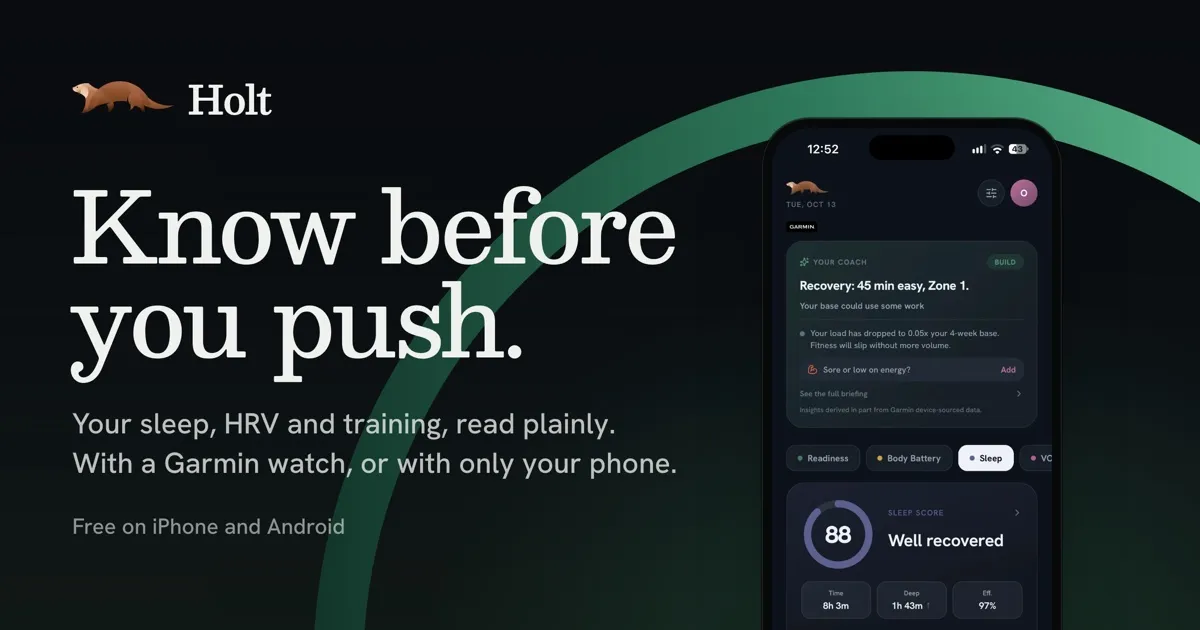
Holt is live. After a long stretch of development, our fitness app is on the App Store and Google Play, free, with no ads and no account needed to start. If you wear a Garmin, Holt reads what the watch recorded and tells you in one sentence what today can take. If you don’t, it still tracks your walks, runs and rides from your phone. There’s more about it at holt.otterdev.me.
This post is the longer version: why we built it, what’s in it, how it works underneath, what it collects, and what it took to get here.
Why we built it
Garmin watches record a lot about your body: sleep, heart rate variability, stress, resting heart rate. The app that comes with them keeps most of it a tap or two too deep, and on an ordinary morning the question you actually have is much simpler. Is today a day to push, or a day to ease off?
Holt starts from that question. Most of our client work lives on someone else’s roadmap, so we also wanted a product of our own, something we’d open every day, which is a good way to keep our mobile work sharp between client projects.
The name is the old word for an otter’s den: somewhere to rest, and come back out stronger.
What it does when you open it
When you open Holt in the morning it has already read last night’s sleep, your HRV and the training you did before today, and it says in a single sentence what today can take. Every day gets one of five calls: rest, recover, hold, build or push. The call is sized from what you did in the days before and judged against your own baseline, nobody else’s. It also compares your recent training load with your four-week base, and says so when that load has dropped far enough that your fitness will start to slip.
If the day has a session in it, Holt writes the session out: how long, and how hard. A threshold day might read “15 min easy, 25 min in Zone 4, 10 min easy.” One tap sends it to your Garmin as a workout for today, so the watch runs the steps and holds you to its own heart rate zones. Switch on “Send every morning” and it’s on your wrist before you’re out of bed.
Afterward Holt checks what you did against the call (on plan, harder, or lighter), and tomorrow’s call takes that into account.
The numbers are all still there, one tap behind the sentence. Sleep, HRV, Body Battery and the rest are Garmin’s own measurements, shown as measured and never re-scored. Holt only adds its reading of them on top.
A short morning check-in covers what a watch can’t feel: sleep, energy, soreness and stress. It takes about ten seconds, and today’s call takes your answers into account.
It works without a watch
Holt doesn’t need a Garmin to be useful. Record a walk, run, ride or hike with your phone’s GPS and step counter and it lands in the same place as everything else, with the route, pace and distance. A recording stays visible without opening the app: a Live Activity on the lock screen and Dynamic Island on iPhone, and a persistent notification on Android.
With no watch there’s no heart rate, so sessions are written as effort out of ten instead, or as walks if walking is what you do. When you finish a session you can rate the effort yourself, and if you skip that, Holt estimates it from your pace on the same scale. The Cooper and Rockport fitness tests are built in too, so you can estimate VO2 max with nothing but a stopwatch.
What else is in it
- Activities. The route colored by heart rate, speed or climb, then splits, time in each zone, charts, and a plain line on how it went. Any two activities can be laid side by side with a verdict on which came out ahead.
- Records. Best times from 1K up, plus longest, fastest and most climbing, kept per sport. Your phone buzzes once when you beat one.
- Strength. A routine builder with supersets and rest timers. Follow a routine on your phone, send it to your Garmin, or share it as a link that adds it to someone else’s app in one tap.
- Vitals, trends and calendar. Every health marker in one list with its own history a tap away, weeks and months of pace, distance and heart rate per sport, and the training month at a glance.
- Sharing. Any activity becomes a 1080 by 1920 image, on white or over one of your own photos. Holt hands it to your phone’s share sheet and nothing is posted for you.
- Lock screen and home screen. Widgets, plus the Live Activity while you record.
- Notifications. A record, a goal reached, a finished night. Each one switches off on its own.
- Theming. Five backgrounds and eight accents, light or dark.
Why it’s an app and not a website
A lot of businesses that ask for an app would be better served by a good mobile website, and we’ve written about how to tell which one you need. Holt is on the other side of that line. A web page can’t keep recording your route while the phone is locked, put a Live Activity on the lock screen, or show a widget on the home screen, and Holt needs all three.
How the data gets there
Connecting a Garmin account goes through Garmin’s own sign-in, which our backend handles. After that the app never asks Garmin for anything. Garmin’s Health API sends new activities and health data to our server as they become available, and the app reads what has already arrived. That keeps the app quick to open and means it isn’t polling a third party every time you look at it.
Activities you record on the phone are saved in the same shape as the ones that come from Garmin, which is why both sources show up on one screen without special cases. A walk recorded on a phone and a run recorded on a watch go through the same screens, the same records and the same comparisons.
On the phone, Holt is Expo and React Native on the New Architecture, written in TypeScript, with Expo Router for navigation, Reanimated driving the ring gauges and press animations, and MapLibre drawing every recorded route. MapLibre is open source, so nothing depends on a Google or Apple Maps key. One codebase ships to both stores. Behind the app is a small Node and TypeScript API with Postgres for storage, running in Docker, with unit and integration test suites.
What it collects
There are no ads, no analytics and no tracking libraries in Holt, and nothing is sold. You don’t need an account to start: on first launch the app makes a random ID on your phone and ties your data to it. An account, which is only an email and a password, exists so your history can follow you to a second phone. The trade-off is that without one there’s usually no way for us to recover what lived only on a lost device, and the terms say so plainly.
What the app does collect, and why:
- Location, to record an activity. Background tracking runs only while a recording is in progress.
- Motion data from your phone’s sensors, to count steps during a recording.
- Garmin health and activity data, only if you connect a Garmin account, and only the data types you authorize.
- Details you add yourself, like age, weight or height, and the strength routines you build.
- Your IP address, used only to guard against abuse, such as rate-limiting repeated login attempts.
Your health data is used to show your history back to you and to make the day’s call. You can delete individual activities from their detail screen, or delete the whole account from Settings, which removes your activities, Garmin history, routines and profile for good. You can also revoke Holt’s access from your Garmin Connect settings at any time, independent of the app. The details are in the privacy policy and the terms.
What it took to get here
Holt is one app on your phone and several projects underneath: the mobile app, the backend that holds your data and talks to Garmin, the account system, the share images, the notifications, the store listings and submissions for two platforms, the privacy policy and terms, and the site that introduces it. None of them is exotic, but there are a lot of them, and that’s a large part of why this took as long as it did.
Late August was the last time we wrote about it before now. The backend was live and the Garmin connection worked end to end, but the app wasn’t on the stores yet. The privacy policy had come first, in early August, because both stores want one before they’ll look at an app, and the terms followed in early September. What was left at that point was what’s left on every app before launch: time on real devices, and tightening what felt rough.
Get it
Holt is free on iPhone, which needs iOS 16.4 or later, and on Android.
Built the way we build client apps
Holt is one codebase for both stores and a backend small enough for us to hold in our heads, and it collects only what its features need. That’s the same approach we take on client work. If you’re thinking about an app of your own, our mobile app service covers it.